Lenovo boot menu
Probably, on a modern Lenovo,
Switch the computer off— press the start button for about 20 seconds
Do not use the buttons onscreen. Reason: at time of writing, modern computers start in about 10 seconds. That’s average—and I’m telling you, that’s far from objectively good. Back in the 2010s, they could take 50 seconds or more. To get round that, computers nowadays store some of the startup data on the chip, which gives then a ‘quickstart’. But if you use the quickstart, it may skip startup options. I don’t know if a Lenovo loaded with Windows is like this, but I do this, sometimes called a ‘hard’ or ‘full’ powerdown, on any computer
Press the power button again, then repeatedly press ENTER
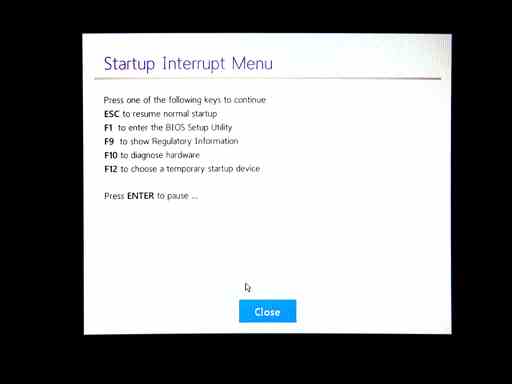
When I say repeatedly press, no need to go crazy (though, in the past, sometimes you needed to go crazy). Press a bit faster than once a second. A Lenovo computer should enter a strange state where it offers a very basic menu
When you see the menu, press ENTER again
This menu has a timeout on it. If you don’t press ENTER again, it may disappear and carry on with startup
Press the little ‘F12’ key
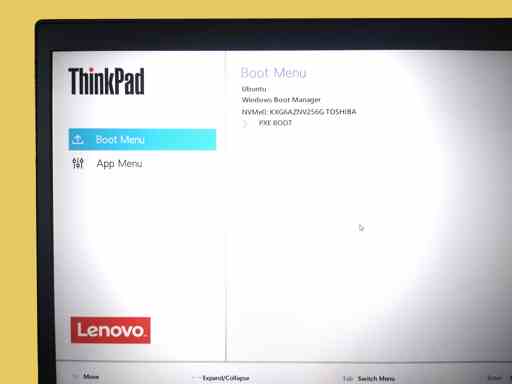
It used to be that you need the ‘fn’ key first to get a proper ‘F12’ press, but Lenovos don’t seem to need that. Hope you get a boot menu. If you have seen old‐style boot menus, which were part of the BIOS, then this menu could surprise you—‐it’s tiny‐font and detailed
I’m not saying this will work on every Lenovo—it works on modern Thinkpads. There’s plenty of advice online that sometimes ‘F12’ is the way to start (and back a few years, ESC and ‘F2’ were sometimes used). Also, some Lenovos have a NOVO button—which is not a keyboard button, it’s a recessed dent like a mobile phone reset that often can be found on the back of IdeaPads.
Kind of thing you’re looking for
Other help
Note that online articles are bulked with syntax variations, abstractions, self‐promotion and, small as it is, don’t describe the process. Lenovo publish their own instructions maybe here but the company need to cover all models so the instructions are very detailed and involve a search for a model number. You don’t need that.
Why?
(nowadays) Nearly always because you want to install an operating system from a USB stick. So a reinstall of Windows or install of Linux.